Ripple | Material Design Landing Page & Coming-Soon Templates Pack
- Created: 03/10/2011
- Latest update: 11/04/2018
- By: ColorLib.Net
- Email: wrapcolorlib@gmail.com
Please welcome to Ripple - awesome material landing page template pack to kick-start your next project. Bright colors, cool morphing shapes and transitions, animated headlines and much more. Ripple is the material templates pack has all you need to impress your clients at first sight!
Thank you for purchasing this theme. If you have any questions that are beyond the scope of this help file, please feel free to email via my user page contact form here. Thanks so much!
HTML Structure
This theme is a responsive layout with multi-concept content. All of the information within the main content area is nested within the "main" tag. The general template structure is the same throughout the template. Here is the general structure:
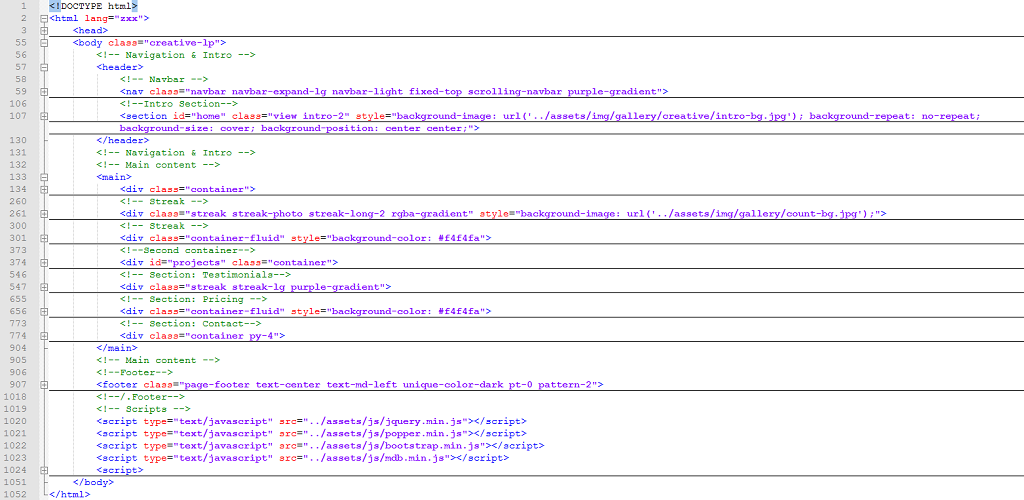
The template is based on bootstrap 4 library, please read more about bootstrap here:http://getbootstrap.com/docs/4.1/getting-started/introduction/ To edit the template, a very basic knowledge in dealing with bootstrap is required.
The Html file can be edited in any text editor, best example is Notepad++.
Files Structure
ripple	-| html	-| assets	-| css	-| bootstrap.min.css
					-| font-awesome.min.css
					-| mdb.min.css
					-| style.css

				-| fonts-| fonts directory

				-| img	-| avatar
					-| demo
					-| gallery
					-| lightbox
					-| overlays
				-|  js-| bootstrap.min.js
					-| jquery.min.js
					-| main.js
					-| mdb.min.js
					-| popper.min.js

		-| page-coming	-| creative-soon.html
				-| technology-soon.html

		-| page-landing	-| creative-landing.html
				-| technology-landing.html

		-| favicon.ico
		-| index.html

	-| documentation-| assets
			-| favicon.ico
			-| documentation.html
Colors & Icons
If you would like to edit the color, font, or style of any elements in one of these columns, you would do the following:
Bootstrap Colors
Bootstrap colors is a sensational palette of 300 delightful colors, which will aid you in creating inviting, consistent design.
Each color might be exposed in various tones varying from bright to dark. They all are collated in accessible section, which will
danger-color
#ff4444
danger-color-dark
#CC0000
warning-color
#ffbb33
warning-color-dark
#FF8800
success-color
#00C851
success-color-dark
#007E33
info-color
#33b5e5
info-color-dark
#0099CC
MDB Colors
default-color
#2BBBAD
default-color-dark
#00695c
primary-color
#4285F4
primary-color-dark
#0d47a1
secondary-color
#aa66cc
secondary-color-dark
#9933CC
Dark Colors
elegant-color
#2E2E2E
elegant-color-dark
#212121
stylish-color
#4B515D
stylish-color-dark
#3E4551
unique-color
#3F729B
unique-color-dark
#1C2331
special-color
#37474F
special-color-dark
#263238
Gradient Colors
Icons
- fa-lg
- fa-2x
- fa-3x
- fa-4x
- fa-5x
- fa-lg
- fa-2x
- fa-3x
- fa-4x
- fa-5x
- fa-lg
- fa-2x
- fa-3x
- fa-4x
- fa-5x
- fa-lg
- fa-2x
- fa-3x
- fa-4x
- fa-5x
Sources and Credits
I've used the following images, icons or other files as listed.
Once again, thank you so much for purchasing this theme. As I said at the beginning, I'd be glad to help you if you have any questions relating to this theme. No guarantees, but I'll do my best to assist. If you have a more general question relating to the themes on ThemeForest, you might consider visiting the forums and asking your question in the "Item Discussion" section.
Thanks By: ColorLib.Net
[ NOTE: If you like our template!!! Please consider Five Star () Feedback ]